Showing posts with label remote. Show all posts

Wednesday, October 14, 2020

RV Net - 10/8/2020

Below you can listen to an MP3 file of audio from my FLEX-3000 transceiver, recorded during the second hour of the RV Service Net. I edited an 18-minute recording to remove long periods of no usable signal. I left in a few short segments where a signal was marginal. The result is less than 15 minutes long.

RV Net - part of 2nd hour
The stations heard include: AI1N,W5BUY, W8MQ, N0JHX, KC4GO, and W4BXI. You'll hear W4BXI as net control station transmitting from the following sites, in order: N4GYN, WA5MLF, KC4GO, W4UOA. W4BXI connected to each station via the Internet, using software from RemoteHams.com.
When transmitting from WA5MLF, there is no background radio noise, since the recording captured the VoIP audio coming into the transceiver from the RemoteHams software components.

I have a few other short recordings, from that same net session, that also may be worth sharing.

73,
John WA5MLF


Sunday, October 4, 2020

RCForb testing with foot switch

W4BXI is using a custom circuit to interface an ordinary foot switch to the TX function of the RCForb client program on his Windows PC. We have observed occasional stuttering in his transmit audio during the first 2 seconds or so after the foot switch is pressed. Today I made a recording of his contact on 40 m, transmitting from W4UOA, with a Virginia station. The full 3.5 minute recording is available below for listening.

QSO on 7193 kHz

You can hear the audio stutter just past at about 2:24 in the recording. Below is a 2-second excerpt from the recording along with a screen capture of the audio waveform that shows several quick drop-outs as received in Baton Rouge. 

2-second portion with audio stutter

Additional testing is being arranged to isolate the cause of the drop-outs.


Sunday, September 27, 2020

RV Net - 9/24/2020

Here are 5 audio clips from the second hour of the 9/24/20 (East-Central-Canada) RV Service Net on 7.191 MHz, recorded from my Flex-3000 transceiver in Baton Rouge. Any long time segments with no readable audio have been shortened or edited out. The stations heard are identified above each audio clip. 

John WA5MLF

AI1N
W8OI, WK1F, N4JLR
N4JLR, W8OI, WW1SS
K9JWJ
K9JWJ, W4BXI (via N4GYN), K4ICZ, W4OWT

Tuesday, September 22, 2020

WU5E (Korea) to RVNet -- 9/17/2020

 WU5E checked into the RV Net from South Korea using an Internet remote connection to his Flex-6600 in Tennessee. Below is part of his exchange with net control W4BXI. The audio was recorded by WA5MLF in Baton Rouge on his transceiver.

The figure below shows that WU5E and W4BXI use the Internet to connect to separate transceivers remotely. There is no direct Internet connection between their computers.

Wednesday, January 16, 2019

RV Net Stations and Remote Transceivers

Observations of received signal strength from various participants in the daily East Coast RV Net on 7.191 MHz has revealed a daily pattern of reception range during the 2-hour period of the Net. Below are map views that show distance (as a circle) from each remote transceiver site that is used by W4BXI. Click on any map for an expanded view.

500 mile range: During the early part of the Net, stations within about 500 miles of a remote are not readable from that remote, unless within ground wave range.
300 mile range: During the later part of the Net, stations within about 300 miles of a remote are not readable from that remote, unless within ground wave range. 

500 mile radius from W4UOA

500 mile radius from KC4GO

500 mile radius from WA5MLF

500 mile radius from W6SFG

 
300 mile radius from W4UOA

300 mile radius from KC4GO
300 mile radius from WA5MLF
300 mile radius from W6SFG


Tuesday, June 26, 2018

Volume control on multiple RCForb clients

My previous post showed 3 instances of the RCForb client running on a single computer / monitor setup. The receive audio from all clients connects to a single set of speakers. Although the receive volume sliders on the clients can be used to select the best audio for a given received signal, this is not the most convenient method. An alternative is to use the Windows Volume Mixer.

The (Windows 10) screen shot below includes 2 RCForb client audio sliders.


Any audio source can be adjusted independently from this mixer panel. Any source can be muted by clicking on its blue speaker icon at the bottom of its slider, as shown in the screen shot below.


Send me any questions or comments.

73,
John WA5MLF


Thursday, June 21, 2018

3 Remote Rigs on One Screen

During today's RV Service Net (2nd hour) the net control station W4BXI had the use of 3 remote stations, connected via RemoteHams software.  At my location I arranged a display of the 3 remote clients on my wide screen (2560 x 1080) monitor.  Below is a screen shot of the arrangement.
Click to enlarge.
The RemoteHams RCForb client software provides a single user interface that resembles an Elecraft K3 transceiver, regardless of the brand and model of the transceiver it controls. Each station owner can choose which controls to make available to the remote users.

I closed some of the extra elements of the RCForb client windows, and slid the bottom parts (chat window and list of users) below the bottom edge of my desktop. I could still move a window up temporarily to take a peek at the user list.

The 3 client windows, from left to right, are connected to: WA5MLF, W4UOA and KC4GO. 

The upper left corner of the screen displays the KE9NS version of the PowerSDR program that controls my Flex-3000 transceiver. There I could view the strength and quality of the received and transmitted signals, and access settings that I have not enabled for the remote users.

The upper right has my Firefox web browser window where our Bell Ringers chat window is seen. I have other browser tabs (e.g. email) available for quick viewing with a single mouse click.

Send me any questions or comments.

73,
John WA5MLF


Thursday, April 5, 2018

Remote Station Operation

Here are two articles, with diagrams, that I wrote recently for use in the RV Service Net newsletter.  Any feedback and suggestions are welcome.


Many regulars on the RV Service Net recall that John, W4BXI, served as the second hour net control station on Thursdays, operating from his home at Fort Payne, AL. After moving to Asheville, NC, he now lives in an apartment that has no provisions for HF radio operation. John’s friend Carl, W4UOA, (at Mentone, AL) established a new remote interface to his own station for John to try from his new home. Carl has used other configurations of remote access to his station over a number of years.

Initially John used a single laptop PC, equipped with free software from RemoteHams.com to connect to Carl’s station. After getting familiar with the software interface (RCForb client), and finding it satisfactory for continuing his presence on HF radio, John resumed operation as a net control station. W4UOA is an excellent station for John’s participation in the RV Service Net.

Over a short period of time, John discovered other stations that are using the same RemoteHams software. This provided an opportunity to access other receiving locations, to hear stations that are too close to W4UOA for good reception during the early morning propagation on 40 m. John accessed the Richmond, VA, club station W4FJ that is available for receiving and transmitting, for club members. John also added receive capability provided by his RV Service Net friend Dan, KC4GO, of Casselberry, FL .

Around the same time John asked if my station in Baton Rouge, LA might be able to provide transmit / receive operation using the RemoteHams software. Previously I sometimes provided receive audio from my transceiver to John via a web interface (Google Hangouts), during his time slot on the RV Service Net. I set up the needed RCForb server software on my Windows PC that operates my Flex-3000 transceiver. This enabled John to use another remote station farther to the southwest.

The diagram below shows the current group of remote stations (in 4 states) that John uses from his operating location in North Carolina. Although these remote stations make it easier to hear reports from the many stations that check in, they don’t replace the excellent help provided by relay stations who are often located in even better locations for hearing and talking to the widely-distributed participants.
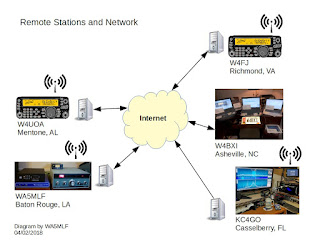
Click above to enlarge.

In a separate article I will provide additional details about how the RemoteHams software connects to radio equipment and the Internet.

John Krupsky, WA5MLF


W4BXI and friends have tested various software and hardware approaches during the past several years for remote operation of ham radio stations. We are currently using software from RemoteHams.com. In a single software package, RemoteHams includes both rig control (along with CW keying, memories and DX spotting) and audio transport. Some previous approaches have required the use of separate audio transport (e.g. Skype) and control software.

The RemoteHams software was designed to interface with the Elecraft K3 transceiver, but currently supports many other brands and models. A single, universal interface is provided for control of any supported transceiver.

For anyone thinking about remote station operation we suggest installing the free RemoteHams (RCForb) client program and using it to listen to any of the online stations listed in the RemoteHams directory. You can find many on this Online Map. The client software runs on Windows computers and Android devices. The RCForb client enables the remote operator to receive and transmit (depending on permissions granted by the station owner) and to select frequencies, modes, power levels and other parameters that are configured at the remote station. The diagram below shows the components at the location of a remote operator. The Documentation section has a good “getting started guide” along with client and server manuals. 
 
Click above to enlarge.

The diagram also shows a RemoteHams server that is used for:
  • registration and authentication of licensed remote operators
  • publishing a directory of online stations that can be used with the RemoteHams software
The server is contacted each time a remote station’s server software or a remote operator’s client software is started, but is not involved in the client-server traffic.

A remote station is not required to be listed online. Many owners of remote stations choose to operate on a non-listed basis, but can allow their friends or club members to access their station with a non-listed link.

To set up a station for remote operation requires interfacing a (supported) transceiver to a Windows computer that is running the free RCForb server program. The diagram below shows the components at the location of a remotely-controlled station. Transceiver interfacing for operating the many digital modes (PSK, FT8, etc.) provides the same capabilities needed for the RCForb server program.

If you decide to explore this mode of operation, we recommend consulting the server manual in the Documentation section and the Support Forum section of RemoteHams.com for additional documentation and tips from other users. The RemoteHams software also provides remote operation of supported amplifiers, antenna tuners and rotators.

Other topics that must be considered for the establishment of a remotely-operated station include:
  • Control of electrical power to radio and computer equipment
  • Ability of radio and computer equipment and software to restart if power is interrupted
  • Protection from lightning and electrical surges
  • Remote access to the server computer if changes to the server software settings are needed
Remote control software provided by the radio manufacturers for their radio products may provide additional capabilities that are not available through the RemoteHams software, such as SDR panadapter views. We suggest that you evaluate the capabilities of any remote control solution that control your radio equipment, and decide based on features that are most important to you.

John Krupsky, WA5MLF

Wednesday, February 14, 2018

Sampling of Group Videos & Screen Shares

While browsing through some files on an older hard drive I found some collected screen shots of some past group videos and screen shares that were common among our group members on morning QSOs. Below is a sampling of these, in order by date, starting in 2009.  The file name of each image shows the date of capture. The newest screen shot is from July of 2017.

Our group sessions made use of three services: Adobe ConnectNow (free for a limited time), Skype and Google Hangouts. Some of the later screen shots show that it is possible to participate in two separate sessions simultaneously on the same computer. In that case it is good to keep track of the microphone muting in each session window.

I added text notations to some of the views. Click on any image below to see an expanded view.


73,
John WA5MLF


Saturday, September 16, 2017

Audio Recordings from 75 m and 40 m

I made several recordings of received audio on my transceiver in Baton Rouge this morning.
Below are links to the MP3 recordings.


3.740 MHz
The marginal copy on this band is consistent with poor propagation at this time of day for my distance from north Alabama. Sunrise today was at 0649 at my location. Some QSB also experienced.
  1. W4BXI at 0818 CDT, talking via N4NR's station, using the RemoteHams Internet interface. At the time, several stations noticed his audio seemed to have room echo or "in the barrel" sound. I think this was his first time to transmit via RemoteHams.
  2. N4NR at 0822 CDT, talking via RemoteHams interface through his home station
  3. W4BXI at 0823 CDT, talking via N4NR's station, using the RemoteHams interface.
  4. N4NR at 0834 CDT, talking via RemoteHams interface through home his station
7.233 MHz
Here are recordings of several stations at the time of our Saturday morning net.
  1. WA4PUB and K9JWJ at 0914 CDT
  2. N4NR at 0919 CDT talking via RemoteHams interface through his home station
  3. KB4XX at 0920 CDT
  4. W4BXI at 0920 CDT talking via N4NR's station, using the RemoteHams interface

John WA5MLF